I've learned enough about masks in photoshop to see how powerful they can be. But, I can't seem to get them to work for me. Every time I try to use a mask it doesn't perform in the way that I would expect. Either is doesn't mask anything at all. Or it locks me into using only one value. None of this seems to make any sense. But, it just isn't working.
Tonight I tried locking pixels, creating clipping masks, using selections, etc. None of it worked. It's frustrating.
Showing posts with label photoshop. Show all posts
Showing posts with label photoshop. Show all posts
10/6/12

9/9/12

5/10/12
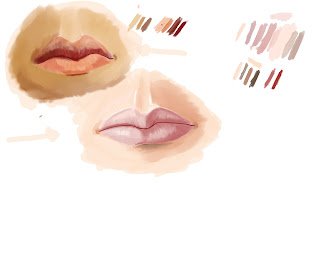
Lips Study 1
I decided to do a study of lips. Really, just to do something a little different. It turned out alright. Not mind boggling, but not bad. The darker set were done from a photo reference. The lighter set were done entirely from my imagination.
Working with the photo reference I used the color picker to take the colors directly from the photo. I did this after initially doing the colors on my own. I was surprised how far off my values were. I see now that I have a tendency to make things lighter than they really are.
Working with the photo reference I used the color picker to take the colors directly from the photo. I did this after initially doing the colors on my own. I was surprised how far off my values were. I see now that I have a tendency to make things lighter than they really are.
5/7/12
Skull WIP 1
I've read that if you want to understand how to draw people you should know how to draw the bones beneath the skin. Since I'm mostly focusing on heads at this point, that would mean the skull. So, I've decided to draw a skull from photo reference. Here is my progress so far:

Of course, this means that I now have three WIP's going at this time; Tom Waits, Ben Brand, and the new Skull. I'm not sure when I'll get to the Tom Waits one. I've become so focused on drawing on the computer that drawing with actual physical media barely crosses my mind. It shouldn't. But that is just where I am. I'll finish the Ben Brand piece. That's just a matter of there being a part that is confounding me at this moment (the barbell). Who knows when they'll all get complete. Life takes priority...as much as I wish that it didn't.
Of course, this means that I now have three WIP's going at this time; Tom Waits, Ben Brand, and the new Skull. I'm not sure when I'll get to the Tom Waits one. I've become so focused on drawing on the computer that drawing with actual physical media barely crosses my mind. It shouldn't. But that is just where I am. I'll finish the Ben Brand piece. That's just a matter of there being a part that is confounding me at this moment (the barbell). Who knows when they'll all get complete. Life takes priority...as much as I wish that it didn't.
4/14/12

4/5/12

4/2/12
Ben Brand WIP
Here is my progress from my session tonight. It's almost starting to look decent. I still spend more of my time fighting with the software than drawing. This took about an hour.
This is also the first time that I tried drawing directly in Photoshop. What a pain in the butt. I'm sure I'll figure out why its the number one digital art software. But, I'm not yet convinced.

This is also the first time that I tried drawing directly in Photoshop. What a pain in the butt. I'm sure I'll figure out why its the number one digital art software. But, I'm not yet convinced.
4/1/12
New Toys; First Attempt at Digital
I'm giddy like a school girl....and apparently I have the chops of a school girl too.
I just bought a Wacom Intuos 4. I only drooled a little taking it out of the box. I've just had a chance to play with it. Here is the first sketch. It was harder than I anticipated. It's like starting over. It looks like my 6 year old was playing on the computer. Sadly, that is not the case.
Say hello to Freddy!

We just bought a new computer. And I have Photoshop, but I can't figure out how to use it at all. So, I've been doing work in Autodesk Sketchbook Pro. It's very intuitive. But, I'd like to figure out photoshop. I looked at a couple of books in Barnes and Noble. I was hoping to pick one up that could teach me how to use Photoshop. But, it seems like it's all about photo editing. I saw nothing about using photoshop for drawing and art. It makes me wonder why it's the number one digital art software. I'm sure there is a reason for that....and that I'll figure it out eventually.
I just bought a Wacom Intuos 4. I only drooled a little taking it out of the box. I've just had a chance to play with it. Here is the first sketch. It was harder than I anticipated. It's like starting over. It looks like my 6 year old was playing on the computer. Sadly, that is not the case.
Say hello to Freddy!
We just bought a new computer. And I have Photoshop, but I can't figure out how to use it at all. So, I've been doing work in Autodesk Sketchbook Pro. It's very intuitive. But, I'd like to figure out photoshop. I looked at a couple of books in Barnes and Noble. I was hoping to pick one up that could teach me how to use Photoshop. But, it seems like it's all about photo editing. I saw nothing about using photoshop for drawing and art. It makes me wonder why it's the number one digital art software. I'm sure there is a reason for that....and that I'll figure it out eventually.
Subscribe to:
Posts (Atom)