Now that I've had a chance to spend a little more time with the Intuos5 I've uncovered a few warts. But, I've also become even more impressed with some features. So, all in all I'm still just as excited about the product.
First, the bad. The touch features are buggy. Sometimes they just don't seem to respond. Additionally, the rotate feature is not as useful as I would have thought. Zooming and scrolling is nice....but again, when it works. However, I'm thinking that some of these issues are user error, or buggy drivers. Both of those issues should improve over time. It would be nice if they gave you a little more control over how sensitive/fast the rotate, zoom, etc. features responded.
Also, the heads up display seems to have a mind of its own. Perhaps I just haven't quite figured it out. Yet, it seems that it comes up when it's not needed, but when I need it I can't get it to pop up. Again, perhaps I'm just an apologist, but I figure I'll get to know the settings over time to where I don't need the heads up display at all.
On an incredibly nit picky note, the power button on the side of the wireless module is pretty hard to find without physically picking up the tablet and holding it six inches from your face. A small issue, and one that brings me to....
The good. The wireless kit is awesome. I love sitting on my couch with no wires connecting me to anything and drawing on my laptop. It's great. Of course, I never had the bluetooth wireless version for the Intuos4. So, I have nothing with which to compare it.
I've become even more impressed with the touch and accuracy. It just seems to react better to a lighter touch. Perhaps that is more about me becoming accustomed to the tool than as actual feature of this tablet?
I've become more impressed with the radial windows than I thought that I would. There are so many things that you can do with this. The only question becomes what hotkeys, actions, etc. to put where. It is so customizable that I can see it taking months to figure out all of the customizations. I haven't been doing this long enough to really have a work flow. But, I can understand the importance of a workflow to your overall productivity. I don't think that anyone can deny that the Intuos5 has the potential to improve your workflow well beyond what was offered with the Intuos4.
Showing posts with label intuos4. Show all posts
Showing posts with label intuos4. Show all posts

4/23/12
Wacom Love
I'm so in love with my new Wacom Intuos4 Small that I decided to upgrade to the new Intuos5 Medium. I returned my small to Best Buy. Now, I have to wait about a week while the new one ships. I'm super excited to try it out. I'll be picking up the wireless kit as well. So, I'll be able to sit on my couch and draw. Super excited. But, Now I have to wait a week.
4/2/12
Wacom Intuos Power Session!
Here is my second attempt at drawing on the Wacom Intuos4. This is a photo of a friend of mine; powerlifter Ben Brand. He's a strong dude. There's like 700lb.s on that bar...I'm not exaggerating.
Here is the photo reference:

Here is the first sketch. You can see that the upper body is too narrow and leaning forward.

Here is the second attempt. Closer. But not quite right.
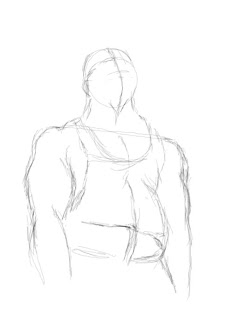
All of this represents about 45 minutes of work....most of which was figuring out the software. Actual drawing time was probably only about 15 minutes. I'm pleased at the progress. But, I have a way to go. Adapting to the Wacom is more difficult than I anticipated.
Here is the photo reference:

Here is the first sketch. You can see that the upper body is too narrow and leaning forward.
Here is the second attempt. Closer. But not quite right.
All of this represents about 45 minutes of work....most of which was figuring out the software. Actual drawing time was probably only about 15 minutes. I'm pleased at the progress. But, I have a way to go. Adapting to the Wacom is more difficult than I anticipated.
4/1/12
New Toys; First Attempt at Digital
I'm giddy like a school girl....and apparently I have the chops of a school girl too.
I just bought a Wacom Intuos 4. I only drooled a little taking it out of the box. I've just had a chance to play with it. Here is the first sketch. It was harder than I anticipated. It's like starting over. It looks like my 6 year old was playing on the computer. Sadly, that is not the case.
Say hello to Freddy!

We just bought a new computer. And I have Photoshop, but I can't figure out how to use it at all. So, I've been doing work in Autodesk Sketchbook Pro. It's very intuitive. But, I'd like to figure out photoshop. I looked at a couple of books in Barnes and Noble. I was hoping to pick one up that could teach me how to use Photoshop. But, it seems like it's all about photo editing. I saw nothing about using photoshop for drawing and art. It makes me wonder why it's the number one digital art software. I'm sure there is a reason for that....and that I'll figure it out eventually.
I just bought a Wacom Intuos 4. I only drooled a little taking it out of the box. I've just had a chance to play with it. Here is the first sketch. It was harder than I anticipated. It's like starting over. It looks like my 6 year old was playing on the computer. Sadly, that is not the case.
Say hello to Freddy!
We just bought a new computer. And I have Photoshop, but I can't figure out how to use it at all. So, I've been doing work in Autodesk Sketchbook Pro. It's very intuitive. But, I'd like to figure out photoshop. I looked at a couple of books in Barnes and Noble. I was hoping to pick one up that could teach me how to use Photoshop. But, it seems like it's all about photo editing. I saw nothing about using photoshop for drawing and art. It makes me wonder why it's the number one digital art software. I'm sure there is a reason for that....and that I'll figure it out eventually.
Subscribe to:
Posts (Atom)